Teams and access
Four mechanisms decide whether somebody can reach a repository. This example uses all four, and the point of it is where each one is declared.
# Who can reach what: teams, their membership, and the grants that let them in.
#
# Four mechanisms decide whether somebody can reach a repository, and they are
# declared in two different places on purpose:
#
#   organization.members.base_permission   a floor under every repository
#   organization.teams.<slug>.membership   who is on a team
#   organization.roles.<name>              who holds an organisation role
#   access.teams / access.users            what a team or person may do *here*
#
# The last one is declared from the repository side even for teams, so there is
# one place to read a grant rather than two places for them to disagree.
#
#   export GITHUB_TOKEN=...
#   octoform inspect members --config octoform.yml   # who is here already
#   octoform plan            --config octoform.yml
#
# Every login below is fictitious. Replace them, and read `inspect members`
# before applying: a grant to somebody who is not in the organisation becomes
# an invitation, and an invitation nobody accepts is access that never arrives.

version: 1
owner: example-org

organization:
  members:
    # Nothing is granted by default. Every path to a repository below is one
    # this file states.
    base_permission: none

  teams:
    # A parent. It has children, so it cannot be secret — GitHub does not keep
    # that shape, and octoform refuses it while planning rather than sending it.
    platform:
      name: Platform
      description: Owns the shared build and release tooling
      privacy: closed

    # A child. It names its parent by slug. If this run is creating `platform`
    # too, this team waits for it — and is blocked, not attempted, if that
    # creation fails.
    platform-oncall:
      name: Platform on-call
      parent: platform
      privacy: closed
      notifications: false
      membership:
        maintainers: [example-lead]
        members: [example-dev-a, example-dev-b]
        # Additive. Nobody is removed for not appearing above.
        #
        # `authoritative: true` asks for the other behaviour and is refused in
        # two cases: when the lists name nobody, and when it would remove the
        # account the run is authenticated as.
        authoritative: false

    security:
      name: Security
      description: Reviews what reaches the default branch
      privacy: closed
      membership:
        maintainers: [example-security-lead]

  # Assignment only. There is no endpoint that creates an organisation role, so
  # a name that matches nothing is refused as a name rather than treated as a
  # definition. Both granting and revoking are sensitive: a role reaches every
  # repository the organisation owns.
  roles:
    Security manager:
      teams: [security]

defaults:
  access:
    teams:
      platform: maintain
      security: read

repos:
  example-service:
    access:
      teams:
        # Narrower than the default above, for this repository only.
        platform-oncall: admin
      users:
        # A direct collaborator. If they are not one yet, this becomes an
        # invitation, and octoform reads pending invitations so it is not sent
        # again on the next run.
        example-contractor: write

  example-archive:
    access:
      users:
        # Revocation is a word, not a deletion. Removing this line would stop
        # managing the grant; it would not take it away.
        example-former-contractor: none
The four paths
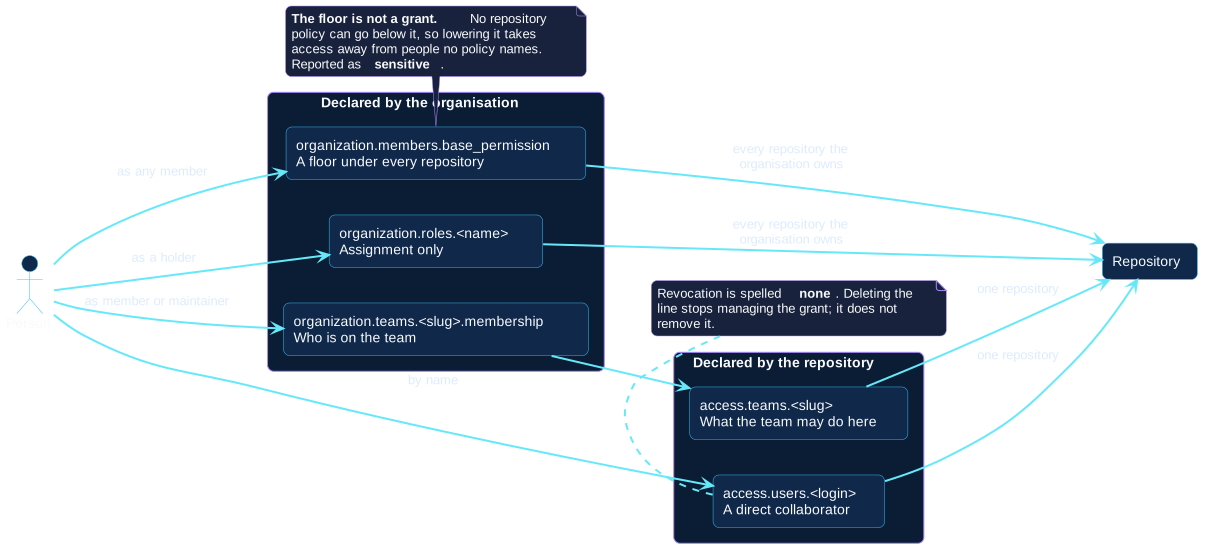
| Path | Declared under | Reaches |
|---|---|---|
base_permission |
The organization | Every repository it owns |
| An organization role | The organization | Every repository it owns |
A team plus access.teams |
The organization, then the repository | The repositories that grant it |
access.users |
The repository | That repository |
The example starts from base_permission: none, so every path into a
repository is one the file states. That is the arrangement worth aiming at, and
it is a large change to make on an organization that has been running on a
read or write floor — see step 2 of the
organization example.
Why a team grant is declared on the repository
A team is created under organization.teams. What it may do to a repository
is declared under that repository's access.teams.
Splitting it that way is deliberate. One grant has one place to read it; two places to declare it would be two places for them to contradict each other. It also means the question "who can reach this repository?" is answered by reading that repository's policy, rather than by searching the whole file for teams that mention it.
Nesting, and the order it forces
platform-oncall names platform as its parent. Three things follow, and none
of them depends on the order the file is written in:
- If this run creates both, the parent is attempted first.
- If the parent's creation fails, the child is blocked rather than sent to sit under a team that does not exist.
- Neither can be
secret: a team with a parent cannot be, and neither can a team with children. Octoform refuses that shape while planning rather than sending it and being refused.
Read the room before applying
Every login this file names is checked against the people the organization actually has:
  named by the configuration but not in the organisation:
    example-dev-b: organization.teams.platform-oncall.membership.members
    example-contractor: repos.example-service.access.users
Those are the grants that will turn into invitations. An invitation nobody accepts is access that never arrives while the file goes on claiming it does — and somebody who is not in the organization at all cannot be put on one of its teams, so that line will block until they are.
Adding them is a command, one person at a time:
Removal is always a word
Nothing in this file removes anybody by omission.
access.users.example-former-contractor: nonerevokes the grant. Deleting the line would only stop managing it.membership.authoritative: false— the default — means the membership lists add people and never remove them. Setting it totrueis what asks for removal, and it is refused if the lists name nobody, or if it would remove the account the run is authenticated as.
Both revocations are reported as destructive. Taking somebody off a team
takes them out of every repository that team reached.