How rup-flow works
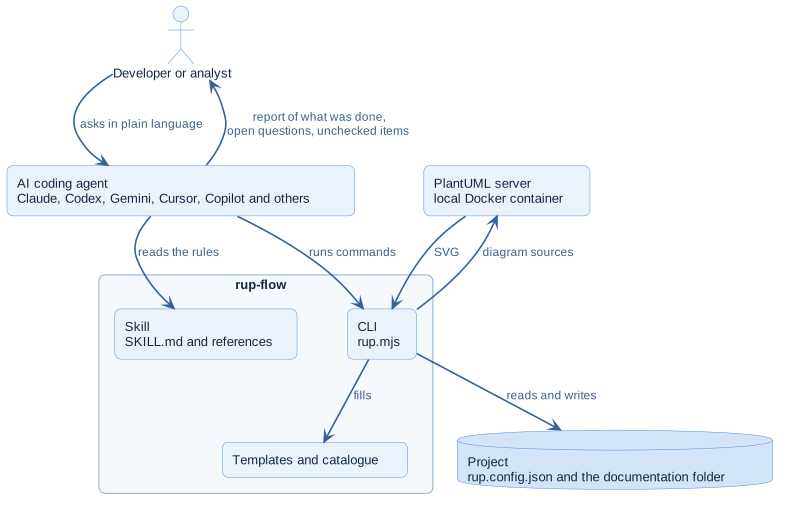
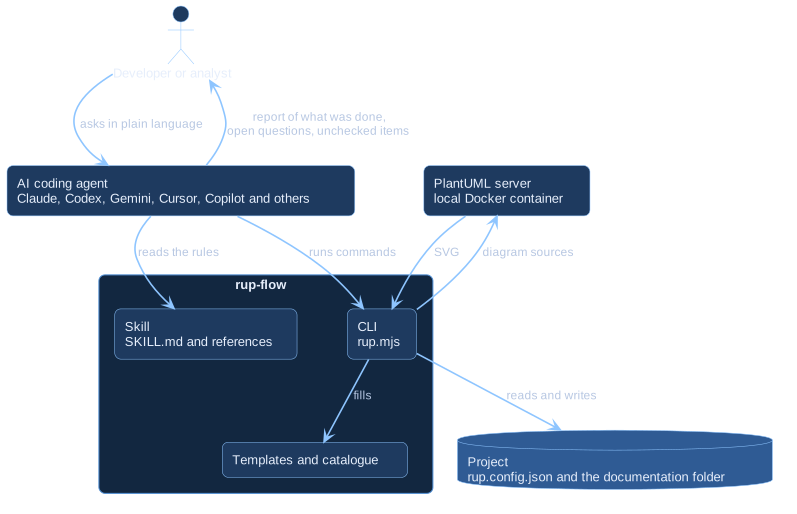
The skill
SKILL.md holds the operating rules and tells the agent which reference to read
for each request. The references (methodology, domain-model, use-cases,
diagram-conventions, structure) are loaded on demand so the agent spends its
attention on your project, not on boilerplate.
The skill is written once in the open Agent Skills format. Agents that do not read that format read a small instruction file instead; see Compatible agents.
The CLI
A dependency-free Node.js program does the mechanical work:
| It does | Command |
|---|---|
| Creates the structure and the configuration | init, new use-case |
| Keeps the use-case index in sync with the cards | index |
Draws .puml sources into .svg |
render |
| Verifies structure, links and diagrams | check |
| Writes the block that agents without skills read | instructions |
| Tells what is installed | version, editions |
The operating rules
- Read the configuration first.
- Mark every statement as confirmed, assumed or open.
- Never invent permissions, rules, states or attributes.
- Write where the configuration says.
- Do not claim a diagram is rendered or checked unless it was.
- Write documents in your language; keep identifiers in English.
- Keep one source of truth per artifact.
See Provenance marks and the architecture.
Editions
The same CLI runs both editions. rup-flow Pro adds an extension that the CLI loads when it is present; without it, the CLI is the free edition and says so when you ask for something outside it. Read Editions and the extension point.