Architecture
rup-flow is a skill plus a small command line. The skill tells an AI coding agent what to do and what never to do; the command line does the work that must be exact: creating structure, keeping an index in sync, drawing diagrams and checking the result. There is no service, no account and no dependency to install beyond Node.js 18.
This section explains how the pieces fit, in the order a newcomer needs them.
The shape in one picture
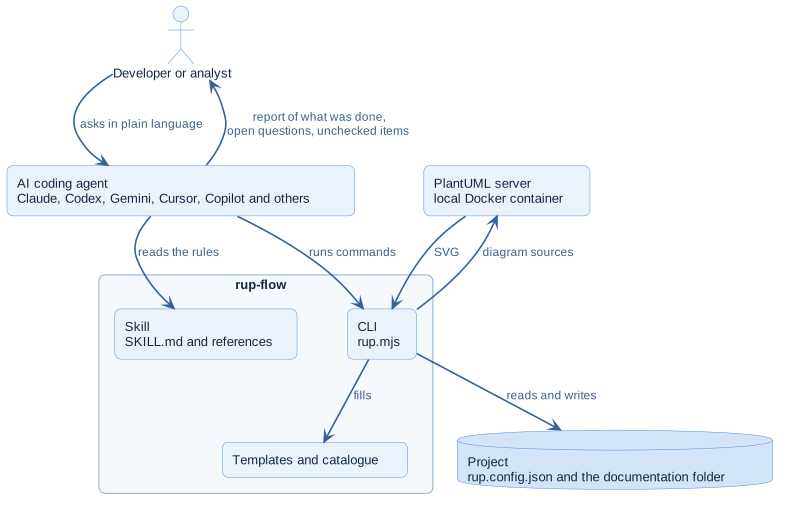
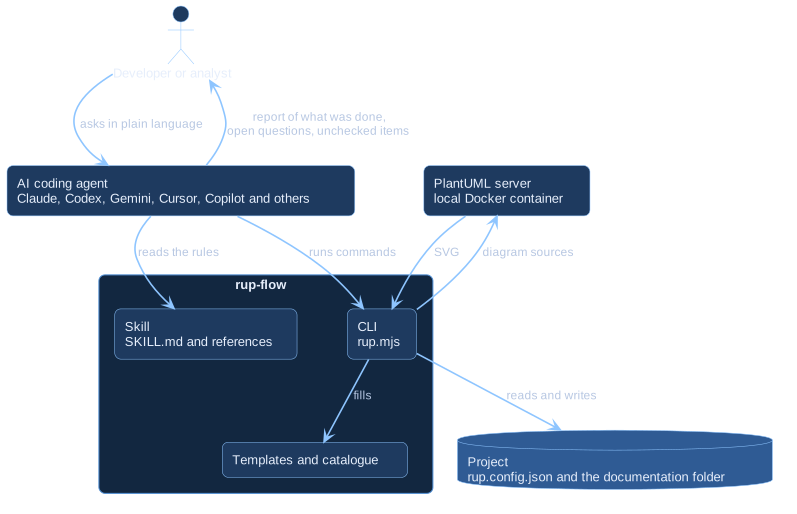
The person never talks to rup-flow directly. They talk to an agent. The agent reads the rules of the skill, runs the CLI for the mechanical steps and writes the documents itself, because understanding a business is the part that needs a language model. Each side does what it is good at, and the boundary between them is a plain command line that any agent with a shell can use.
Principles
| Principle | What it means in practice |
|---|---|
| One portable core | The skill follows the open Agent Skills format. Anything specific to one agent lives in a small adapter and never in the skill |
| The agent analyses, the CLI does the boilerplate | Structure, indexes, rendering and checks are deterministic code; judgement stays with the agent |
| Honesty over completeness | The rules forbid inventing content, and the CLI refuses what an edition does not include instead of faking it |
| Nothing to install | Node.js 18 or newer is enough; Docker only draws diagrams |
| Two editions, one code base | The free CLI loads an extension when it finds one; there is no fork |
Where to read next
Structure
The system context, the runtime containers and the components inside the CLI.
Runtime behaviour
What happens when the agent adds a use case, renders diagrams or starts the CLI.
Editions and the extension point
How one command line is both the free and the Pro edition.
Quality and decisions
The qualities the design protects, and the decisions behind it.