Trust and data flow
rup-flow has no account, no analytics and no service of its own. This page lists every boundary it touches.
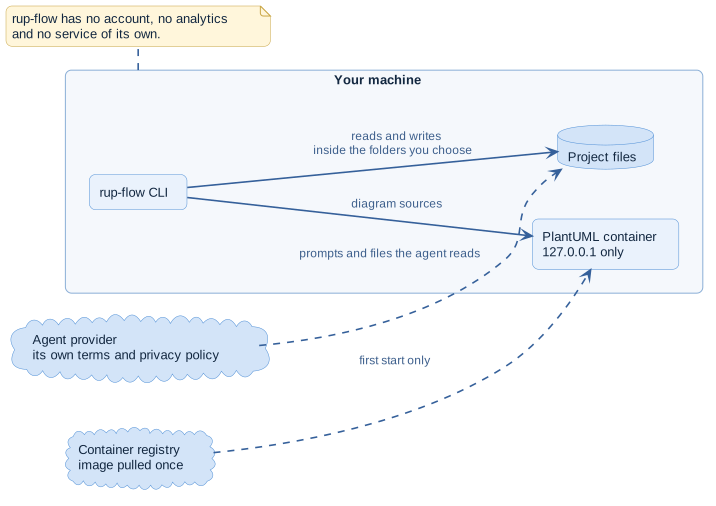
On your machine
| It does | Where |
|---|---|
| Reads and writes files | Inside the folders you point it at: the documentation directory and rup.config.json |
| Sends diagram sources | To the PlantUML server you run locally, http://127.0.0.1:8085 by default |
| Pulls a container image | The PlantUML image from its public registry, the first time you start the server |
Nothing else is sent anywhere. rup-flow Pro adds one more image, the Mermaid renderer, pulled the first time you choose Mermaid.
The agent
The AI agent you use with the skill processes your prompts and the files it reads under its provider's terms and privacy policy, not rup-flow's. rup-flow cannot see or limit that. Choose an agent whose terms fit the material you document.
The PlantUML container
The bundled compose file publishes the container on 127.0.0.1 only and runs it with the
SANDBOX security profile, which blocks file and address access from diagrams. Do not
expose that port to a network without adding authentication. The CLI never uses an
!include of a file or an address in the sources it writes.
Written output
Generated documentation contains whatever you or the code contain. Review it before you publish it, especially output derived from code in rup-flow Pro: paths, configuration and table names.
The explorer Pro
explorer.html carries a content security policy that blocks every external load, and
inserts diagrams and documents as nodes, never as raw HTML. It can be shared as a file.
Reporting a vulnerability
Report vulnerabilities privately to the maintainer; do not open a public issue. The security policy explains where.